


Floating-Point Numbers and Arithmetic Expressions
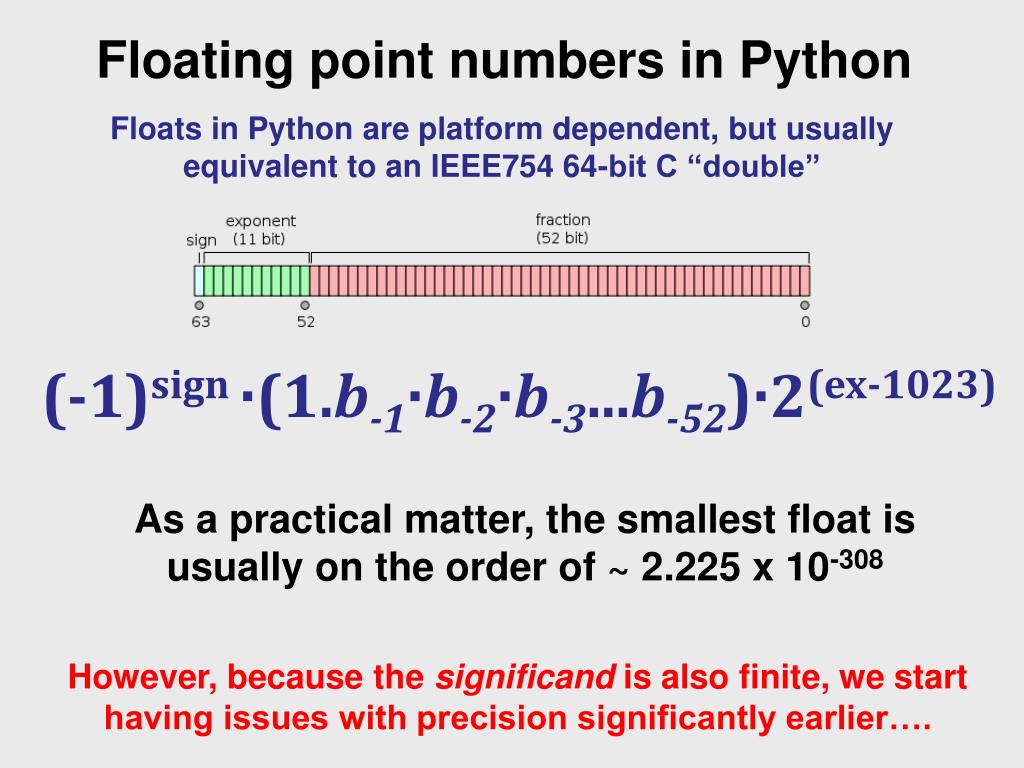
Floating-point numbers
A floating-point number is a number with a decimal. Ex: 3.14, or -123.5. float is a data type for floating-point numbers. A floating-point literal is the number being used in your python code. Ex: weight = 145.2
Use scientific notation for huge numbers such as 1.87x1045. Ex: 1.87e45. The e stands for exponent. The value range for floating-point numbers is from 2.3x10-308 to 1.8x10308. range. Assigning a variable outside this range causes an OverflowError. Overflow happens when a value is too large to be stored in the memory allocated by the interpreter.
When printing floating-point numbers, use f string formatting to specify the number of decimals to print out. Ex:
print(f'{math.pi:.3f}')
Arithmetic expressions
Expression: any combination of items such as variables, literals, operators and parenthesis. Ex:
x = 5 * (y + 2).
In an expression, the right-hand side is evaluated first to get the value, and then assigned to the left-hand side. Literals are actual values in your code. Commas are not allowed in integer literals, so 1,000 is written as 1000
Arithmetic Operators: +, -, *, /, **
Note: ** is exponent (x ** y is x to the power of y)
Compound arithmetic operators
Compound operators are a shorthand way to update the value of a variable
- Addition assignment: +=
- Subtraction assignment -=
- Multiplication assignment: *=
- Division assignment: /=
- Modulo assignment: %=
For example: x = x + 5 is equivalent to x += 5
Division and Modulo operator
For division use the / operator, which returns a floating-point number. For floored division use the // operator, which rounds down the result. Division by 0 is not allowed.
The modulo operator % get the remainder of dividing two integers. Ex: 5%2 is 1. Modulo is useful for finding out if a number is odd or even, by simply doing number %2 and if it returns 0 it’s even, or 1 then its odd. It’s also useful for determining exact change in a vending machine, for example.

 English
 Arabic
 French
 Spanish
 Portuguese
 Deutsch
 Turkish
 Italiano
 Russian
 Romaian
 Portuguese (Brazil)
 Greek
Greek
